
LOE
[Isaac sim Tutorial] Part 6. ROS2 Joint Control 본문
출처
https://docs.isaacsim.omniverse.nvidia.com/5.0.0/ros2_tutorials/tutorial_ros2_manipulation.html
ROS2 Joint Control: Extension Python Scripting — Isaac Sim Documentation
Graph Shortcut We provide a menu shortcut to build Joint State Publisher and Subscriber graphs with just a few clicks. Go to Tools > Robotics > ROS 2 OmniGraphs > JointStates. If you don’t see any ROS2 graphs listed, you need to enable the ROS2 bridge. A
docs.isaacsim.omniverse.nvidia.com
ADD Joint States
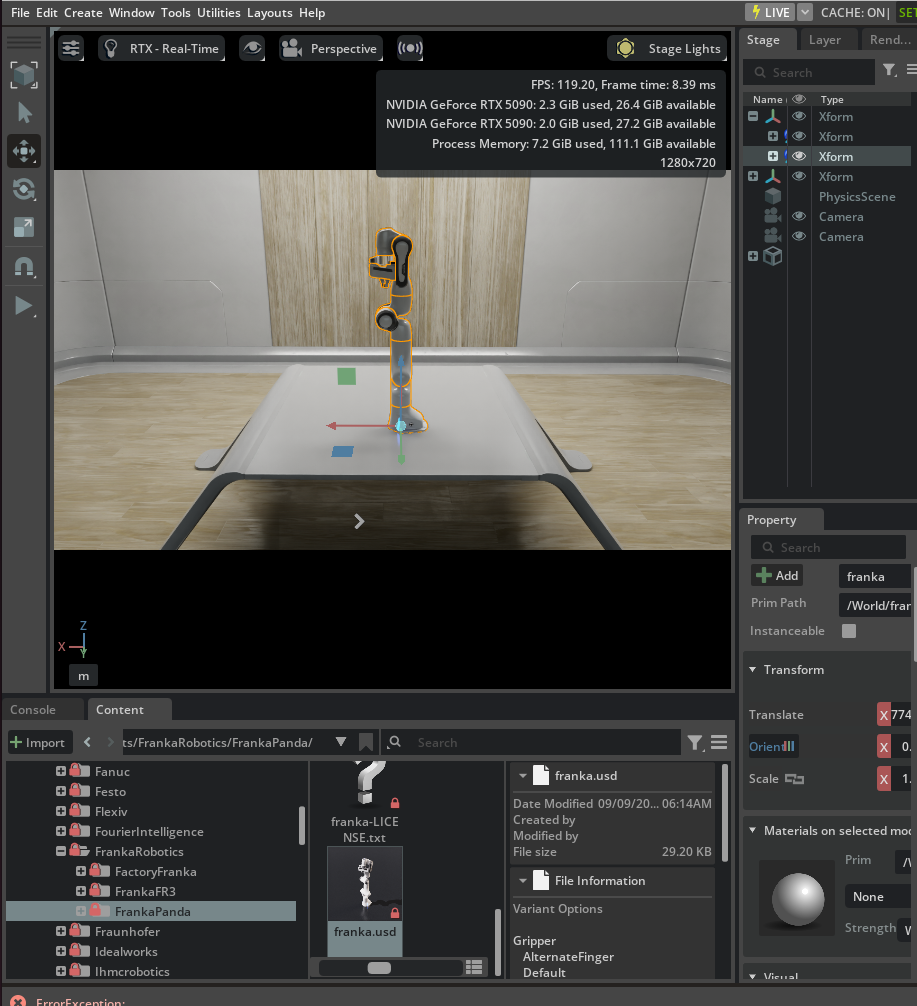
- Isaac Sim>Robots>FrankaRobotics>FrankaPanda>franka.usd 를 추가합니다.
- Window > Graph Editors > Action Graph 에서 Action graph를 생성합니다.
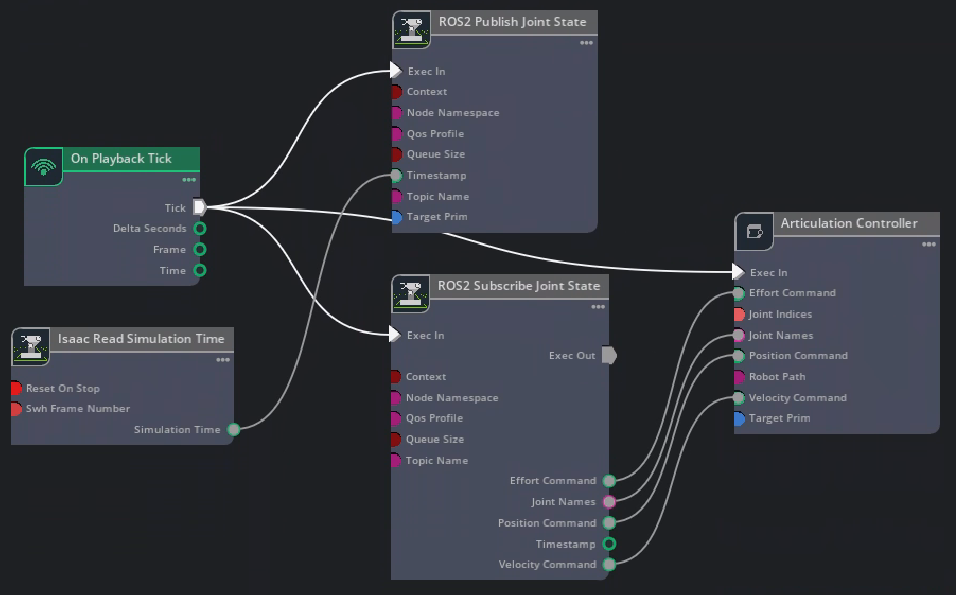
- 위의 그림과 같이 graph node를 추가합니다.
- ROS2 Publish Joint State 노드는 /joint_states topic을 발행합니다.
- ROS2 Subscribe Joint State 노드는 /joint_command 토픽을 구독합니다.
- Articulation Controller 노드는 로봇을 관절을 subscribe 노드의 명령어 대로 움직입니다.
- ROS2 Publish Joint State 노드에서 target을 articulation root api를 가지고 있는 /franka 로봇으로 설정해줍니다.
- Articulation Controller에서 target을 마찬가지로 /franka 로봇으로 설정합니다.
- ros2가 source된 터미널에서 튜토리얼 python 노드를 켜줍니다
- 로봇팔이 움직이면서 /joint_states 토픽을 확인할 수 있습니다.


'isaac sim & lab' 카테고리의 다른 글
| [Unitree go2] Part 1. URDF import (0) | 2025.12.04 |
|---|---|
| [Isaac sim Tutorial] Part 7. H1 휴머노이드 policy 제어 (0) | 2025.12.03 |
| [Isaac sim Tutorial] Part 5. ROS2 Publish rate, Qos 조정 (0) | 2025.12.01 |
| [Isaac sim Tutorial] Part 4. TF trees and Odometry (0) | 2025.11.28 |
| [Isaac sim Tutorial] Part 3. RTX Lidar sensors (0) | 2025.11.27 |
'isaac sim & lab' Related Articles
more


