LOE
ubuntu 22.04에서 isaac sim 5.0 세팅 하는법 본문
출처
- https://docs.isaacsim.omniverse.nvidia.com/5.0.0/installation/quick-install.html
- https://docs.isaacsim.omniverse.nvidia.com/5.0.0/installation/install_ros.html#isaac-ros-docker
ROS 2 Installation — Isaac Sim Documentation
In Ubuntu 22.04, Isaac Sim automatically loads the internal ROS 2 Humble libraries if no other ROS libraries are sourced. In Ubuntu 24.04, Isaac Sim automatically loads the internal ROS 2 Jazzy libraries if no other ROS libraries are sourced. Use the regul
docs.isaacsim.omniverse.nvidia.com
2025년 11월 1일까지 하던 창작모빌리티 대회가 끝난 관계로 이제는 isaac sim와 isaac lab을 통한 강화학습을 배워보려고 합니다.
오늘 포스팅 할 내용은 isaac sim 5.0 설치 방법과 ros bridge 설치법입니다.
호환성 체크
먼저 내 컴퓨터와 isaac sim의 호환성을 먼저 체크해줍니다. 내 컴퓨터는 gpu가 50시리즈에 ram용량도 괜찮아서 문제 없었습니다.
./omni.isaac.sim.compatibility_check.sh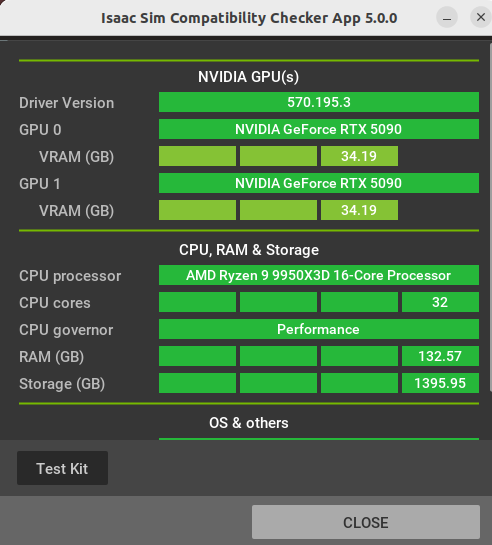
처음에 cpu governor이 save모드로 되어있었지만 perfomance모드로 바꾸어줬습니다.
isaac sim 5.0 설치

이후 4번에서 linux판 8GB 파일을 다운로드 한 후 폴더의 이름을 isaacsim으로 변경하고 홈디렉토리에 위치해 줍니다.
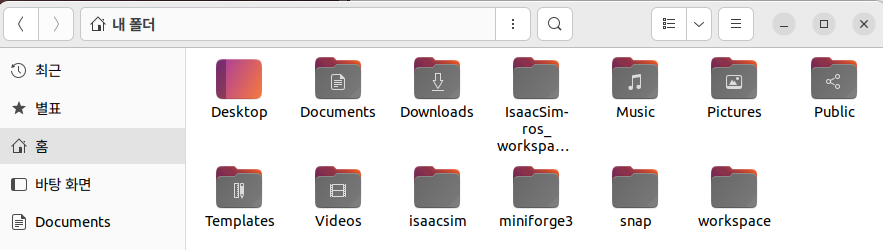
#압축해제 이후 설치 스크립트를 실행해 줍니다.
./post_install.sh
./isaac-sim.selector.sh
ros2 humble & bridge install
하지만 isaac sim과 ros를 연결하기 위해서는 bridge가 필요하게 됩니다. 기존에 4.5.0에서는 extension에 있는 ros2 bridge만 실행해줘도 괜찮았지만 5.0.0에 오면서 isaac sim의 python 버전이 3.11이 되면서 둘을 연결해주는 브릿지가 필요하게 되었습니다.
host에 ros2 설치
https://docs.ros.org/en/humble/Installation/Ubuntu-Install-Debs.html
위의 링크에서 호스트에 ros2 humble을 설치해줍니다.
export isaac_sim_package_path=$HOME/isaacsim

export ROS_DISTRO=humble

export RMW_IMPLEMENTATION=rmw_fastrtps_cpp

# Can only be set once per terminal.
# Setting this command multiple times will append the internal library path again potentially leading to conflicts
export LD_LIBRARY_PATH=$LD_LIBRARY_PATH:$isaac_sim_package_path/exts/isaacsim.ros2.bridge/humble/lib

# Run Isaac Sim
$isaac_sim_package_path/isaac-sim.sh
이후 위의 커멘드로 isaac sim의 환경변수를 설정해줍니다.
setting up workspace
repository : https://github.com/isaac-sim/IsaacSim-ros_workspaces
# 먼저 isaac sim ros workspace를 git clone 해줍니다.
cd ~
git clone https://github.com/isaac-sim/IsaacSim-ros_workspaces.git


# For rosdep install command
sudo apt install python3-rosdep build-essential
# For colcon build command
sudo apt install python3-colcon-common-extensions

# ros2를 source 해줍니다
source /opt/ros/humble/setup.bash

# 다운받은 workspace에서 humble_ws로 들어가서 src파일을 만들어줍니다.
cd humble_ws
git submodule update --init --recursive # If using docker, perform this step outside the container and relaunch the container
rosdep install -i --from-path src --rosdistro humble -y

# 이후 빌드
colcon build
이러한 과정을 거치면 내 host 환경(python 3.10)에서 isaac sim에 필요한 패키지들을 import해올 수 있게 됩니다.
이제 isaac sim 내부 환경(python 3.11)에서 아까 clone한 isaacsim_ros_ws로 가서 dockerfiile을 실행해줍니다. 그전에 저는 docker file의 12 번재 줄을 다음과 같이 수정했습니다. (저만 그런지 몰라도 ubuntu mirror서버를 kakao로 수정하니 해결 가능했습니다)
RUN rm -rf /var/lib/apt/lists/* && \
    sed -i 's/archive.ubuntu.com/mirror.kakao.com/g' /etc/apt/sources.list && \
    apt-get update && \
    apt-get install -y --no-install-recommends \
        git \
        cmake \
        build-essential \
        curl \
        wget \
        gnupg2 \
        lsb-release
cd IsaacSim-ros_workspaces

./build_ros.sh -d humble -v 22.04


source build_ws/humble/humble_ws/install/local_setup.bash

source build_ws/humble/isaac_sim_ros_ws/install/local_setup.bash
최종 isaac sim실행
최종적으로 isaac sim을 실행해보니 내부 library의 rclpy가 import된 것을 확인할 수 있었습니다.
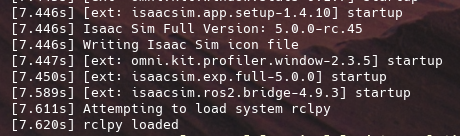
- host와 isaac sim의 환경 차이
| 1. isaac sim 내부환경 | 2. 호스트 ROS2 환경 | |
| python 버전 | 3.11 | 3.10 |
| ROS Client Library | 내부 ros2 라이브러리를 사용하며 python 3.11에 맞춰 컴파일됨 | native ros2 설치본을 사용 |
| 핵심 연결 | ROS2 Bridge 확장을 통해 USD 데이터를 ROS 메세지로 변환/발행합니다. | 외부 ROS노드를 실행하여 시뮬레이션 데이터 및 명령을 발행합니다. |
| RMW | 선택적(기본 FASTDDS 지만 환경변수에 의해 cycloneDDS로 변경가능) | 선택적(기본 FASTDDS 지만 환경변수에 의해 cycloneDDS로 변경가능) |
| 준비 상태 | Isaac Sim을 실행하기 전에 내부 라이브러리 경로(LD_LIBRARY_PATH)와 RMW가 환경 변수로 설정되어야 합니다. | 호스트 터미널에서 source /opt/ros/humble/setup.bash 명령으로 워크스페이스가 소스되어야 합니다. |
| 주요 목적 | 시뮬레이션 데이터 (카메라, Lidar, Odometry) 발행 및 속도 명령 수신. | 로봇 제어, 시각화 (RViz), 네비게이션 (MoveIt 2) 등 ROS 기능 수행. |
'isaac sim & lab' 카테고리의 다른 글
| [Isaac sim Tutorial] Part 5. ROS2 Publish rate, Qos 조정 (0) | 2025.12.01 |
|---|---|
| [Isaac sim Tutorial] Part 4. TF trees and Odometry (0) | 2025.11.28 |
| [Isaac sim Tutorial] Part 3. RTX Lidar sensors (0) | 2025.11.27 |
| [Isaac sim Tutorial] Part 2. Ros2 Cameras (0) | 2025.11.27 |
| [Isaac sim Tutorial] Part 1. Turtle bot을 통한 ros 연결 (0) | 2025.11.26 |


